
What if you lose critical data during a disaster? It’s scary to think about, but something every business (and individual!) must plan for in order to mitigate any damage from such an event.
Data loss disasters can occur due to various circumstances: weather events, fire, theft, voltage surges, and malicious attacks from cybercriminals.
According to Verizon’s 2019 Data Breach Investigations Report, it’s estimated that 43% of all cyberattacks are targeted at small businesses. Some businesses never recuperate from the data and reputation loss and, therefore, must close.
To survive, organizations must embrace a strategy that prepares them to maintain business continuity even when disaster strikes.
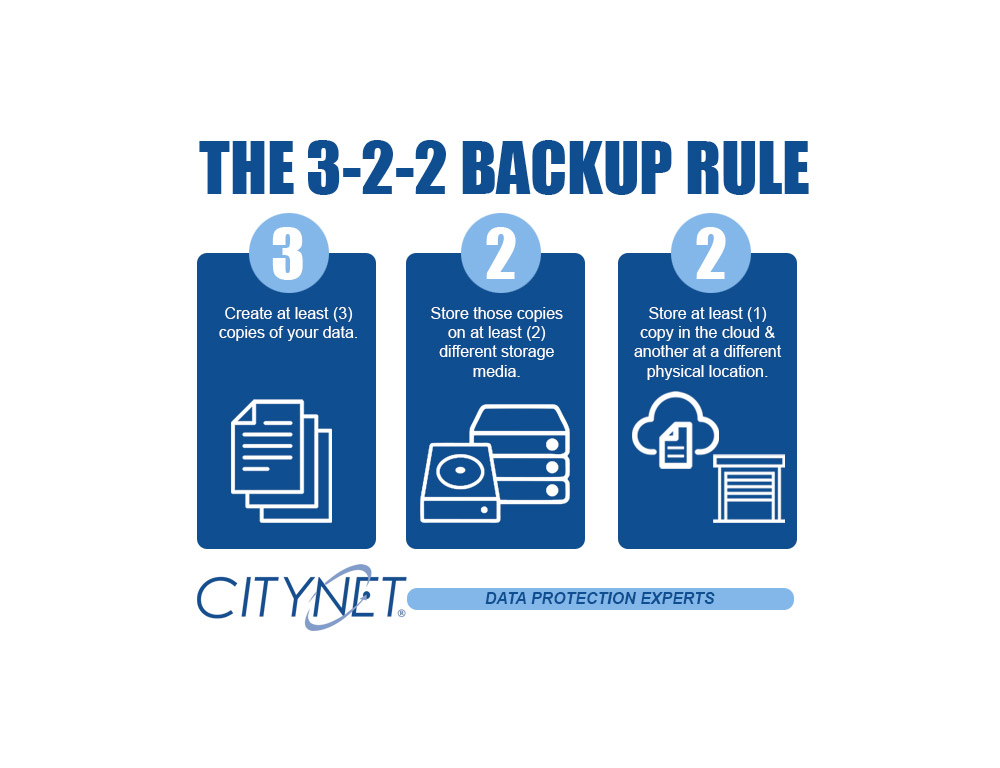
The 3-2-1 is a well-known disaster recovery rule. As technology attacks and failures have increased dramatically, we now recommend the 3-2-2 rule. It simply adds another layer of protection by keeping an additional backup in a different physical location.
The 3-2-2 backup rule is an easy way to implement a backup strategy to keep your data safe in case a failure should happen.
These simple steps ensure that your data is properly backed up.
- Have at least three copies of your backed-up data: Three copies of your backup data help to ensure that there is no single point of failure: two local media types and one off-site in the cloud.
- Store the copies on two different media: Having two physical media types used for your backups is essential. Whether it be USB drives, NAS devices, or any attached storage. Hardware fails, and having the redundancy of two local media types helps ensure a quick recovery.
- Keep one backup copy offsite + one backup copy in a different physical location: Ideally, you will always be able to restore from one of your locally stored media devices, but in the case of a disaster having a copy of your data in the cloud is imperative and adding another in a separate physical location adds additional security and peace of mind.
Securing your data and network from day-to-day threats is a core foundation of our business. Reach out to us, and we will help you secure your digital infrastructure and devise a business continuity plan tailored to your organization.



